


FLEX technology

One hardware platform • Multiple protocols • Endless possibilities

One device, all the protocols you need

FLEX is SENECA’s proprietary multiprotocol technology: the same gateway, power analyzer or I/O module can switch from ModBUS to PROFINET, EtherNet/IP, OPC UA, IEC 61850 or MQTT without changing the hardware, wiring or order code.

How to change protocols FLEX products

FLEX multiprotocol configuration

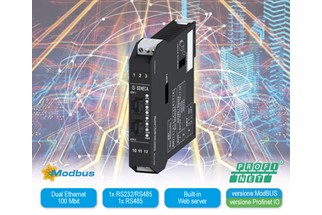
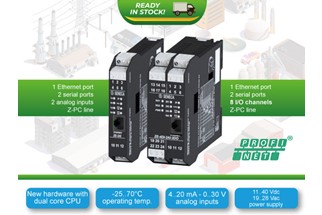
Gateway SENECA Serie KEY con tecnologia FLEXGateways

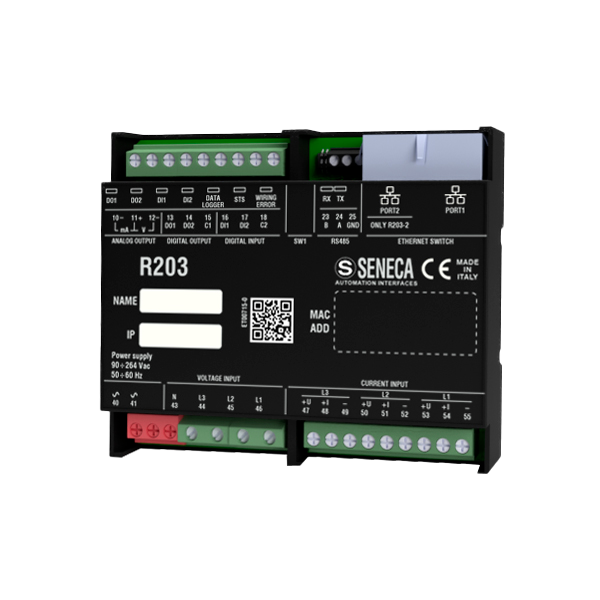
Analizzatore di rete SENECA R203 con tecnologia FLEXPower analyzers

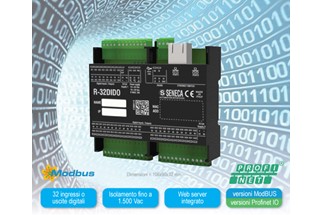
Modulo I/O SENECA ZE con tecnologia FLEXI/O modules

Multiprotocol configuration

SENECA

6

industrial protocol families on the same hardware

30 s

to select a new protocol combination

3

product families: gateways, power analyzers and I/O modules

0

programming tools required; no changes to tags or I/O registers

01 Technology 02 Benefits 03 Protocols 04 Products 05 Procedure 06 FAQ

01 The technology

Industrial connectivity becomes flexible

With FLEX, a single device handles serial and industrial Ethernet network protocols and simplifies communication between PLCs, Master/Slave devices and Client/Server devices. Has the production layout or plant protocol changed? Reconfigure the device instead of replacing it.

Without FLEX

  • A different model for every fieldbus or PLC protocol
  • Multiple order codes, stock items and spare parts to manage
  • Changing protocols = a new device, a new order and additional lead time

With FLEX

  • One hardware platform for multiple protocol combinations
  • One stock item, multiple possible configurations
  • Change protocols in the field while keeping the same wiring and I/O point map

Where it makes a difference

Machine builders

The same machine ships with PROFINET for one customer and EtherNet/IP for another: only the configuration changes, not the bill of materials.

Retrofitting

When a plant switches to a new PLC or fieldbus, the installed devices can be reconfigured without rewiring the control panel.

Spare parts and inventory

Fewer items to keep in stock: one device covers multiple protocols and reduces storage and handling costs.

02 Why FLEX

Benefits at a glance

Multiprotocol

A single multiprotocol solution in a single device.

Maximum connectivity

Serial and industrial Ethernet networks handled by the same hardware.

No programming

No programming software and no changes to tags or I/O registers.

Multiple gateways in one

The functionality of several gateways for the price of one.

Fewer order codes

Simplified order codes, streamlined quotations and orders.

Less inventory

Reduced storage and handling costs.

Ready to evolve

New protocols and product categories are added over time.

03 Interoperability

Supported protocols

On the field side, FLEX devices communicate using ModBUS RTU, ASCII and TCP-IP; on the PLC, SCADA or cloud side, you select the protocol used by the plant.

ModBUS / Serial Device Server e ModBUS TCP-IP

ModBUS / Serial Device Server

ModBUS RTU / ASCII ↔ ModBUS TCP-IP

ModBUS e PROFINET IO

PROFINET IO

ModBUS ↔ PROFINET IO

ModBUS e EtherNet/IP

EtherNet/IP

ModBUS → EtherNet/IP

ModBUS e OPC UA

OPC UA

ModBUS ↔ OPC UA

ModBUS e IEC 61850

IEC 61850

ModBUS ↔ IEC 61850

ModBUS e MQTT(s) o HTTP(s)

MQTT(s) / HTTP(s)

ModBUS ↔ MQTT(s) or HTTP(s), to the cloud and brokers

The protocol is in the code

The product code suffix identifies the active configuration. With FLEX, the same device can switch from one suffix to another.

-0 / baseModBUS

-PPROFINET IO

-EEtherNet/IP

-UOPC UA

-IIEC 61850

-CMQTT cloud

04 FLEX products

Where to find FLEX technology

Compatible devices are identified by the FLEX badge on the product page. Conversion requires the specified hardware revision and the latest firmware.

Family Starting models Available protocols HW revision
KEY Series gateways
protocol converters
R-KEY-LT, Z-KEY-0, Z-KEY-2ETH and the -P, -E, -U, -I, -C versions ModBUS RTU / ASCII / TCP-IP, PROFINET IO, EtherNet/IP, OPC UA, IEC 61850, MQTT R-KEY-LT ≥ C
Z-KEY ≥ F
Z-KEY-2ETH ≥ B
R203 power analyzers
energy management
R203-2-L (24 Vdc), R203-2-H (90..264 Vac) and the -P, -E, -U, -I versions ModBUS RTU / TCP-IP, PROFINET IO, EtherNet/IP, OPC UA, IEC 61850 ≥ D
R Series I/O modules
remote I/O
R-16DI-8DO, R-32DIDO-2, R-8AI-8DIDO-2, R-4AO-8DIDO-2, R-4RTD-8DIDO-2, R-SG3 and the -P, -E versions ModBUS RTU / TCP-IP, PROFINET IO, EtherNet/IP depending on the model (see manual)
ZE Series I/O modules
17.5 mm Z-PC format
ZE-2AI, ZE-4DI-2AI-2DO, ZE-SG3 and the -P, -E versions ModBUS RTU / TCP-IP, PROFINET IO, EtherNet/IP depending on the model (see manual)

The combinations available for each model and the minimum hardware revision are listed in the instruction manual. The MQTT code (-C) is available for KEY gateways.

Gateways and converters

KEY Series: ModBUS, PROFINET, EtherNet/IP, OPC UA, IEC 61850 and MQTT.

Gateways

Power analyzers

R203 Series for energy monitoring, ready to integrate into any plant network.

Power METERS

I/O modules

R and ZE Series: digital, analog, temperature and load cell modules.

I/O systems

05 Easy to configure

How to change protocols

1. Connect

Connect the PC to the FLEX device via Ethernet.

3. Select

Select the new protocol combination: it takes approximately 30 seconds.

4. Reset

With the module powered off, set the DIP switches to “Factory settings reset”.

5. Restart

Power the module back on and set the DIP switches to “Read configuration from Flash”.

Alternatively, the firmware for the new configuration can be uploaded through the device’s web server. After switching, update the PLC and network configuration for the new protocol. Before proceeding, check the website for the latest firmware and manual version.

Example: from a ModBUS gateway to a PROFINET gateway

A Z-KEY-0 installed as a ModBUS gateway becomes a Z-KEY-P PROFINET IO gateway using the procedure described above: the same device, the same connections and a new protocol towards the PLC.

Esempio di riconfigurazione FLEX da Z-KEY-0 a Z-KEY-P

Download SENECA Discovery Device

06 FAQ

Frequently asked questions

What is FLEX technology?

It is SENECA’s proprietary technology that allows a single device to support multiple serial and industrial Ethernet communication protocols. The protocol combination can be changed via software, without replacing the hardware.

Do I need to change wiring, tags or registers?

No. Terminals, field wiring and the I/O point map remain unchanged, and no programming software is required. The PLC and network configuration must, however, be adapted to the selected protocol.

Which products feature FLEX?

KEY Series gateways and protocol converters, R203 power analyzers and R and ZE Series I/O modules. Compatible devices display the FLEX badge on their product page, and new categories will be added over time.

Is my device compatible?

A minimum hardware revision is required, as indicated on the label: for example, C for R-KEY-LT, F for Z-KEY, B for Z-KEY-2ETH and D for R203 analyzers. If in doubt, contact SENECA with the product code and serial number.

Can I return to the original protocol?

Yes. The conversion is reversible: using the same procedure, the device can return to its original configuration or switch to another combination available for that model.

Where can I find SENECA Discovery Device?

The software is free to download from the SENECA website. Before conversion, it is also advisable to check the latest available firmware and the most recent version of the product manual.

Information updated in October 2026. Refer to each product’s instruction manual for protocol combinations, hardware revisions and the detailed procedure.

One hardware platform, multiple protocols: let’s talk

SENECA S.r.l. • Via Austria, 26 • 35127 Padova (I) • Tel. +39 049 87.05.359

sales@seneca.it Gateways Cybersecurity

loading results